ADDONS! YEAH!!!!!
For converting rotation mode without deleting all of your keyframes, you know, in case you want to rotate a bone >180 degrees.
Turn any bone into a controller, no rigify needed! bones can be hard to keep track of bc they all look the same and sometimes they overlap so you can spice up your rig by turning some bones into controllers.
Loom allows you to batch render specific frames (ie. keyframes) rather than having to render every frame in sequence. This is especially useful for stop-motion styled or low frame rate animations, to avoid wasting time rendering copies of frames you've already rendered. Loom also allows you to automatically fill the gaps between rendered frames to complete image sequences!
SIDE TANGENT: Always try to build shaders in eevee when possible, you can still get very good results! Rendering animations in cycles is a pain.. I've fallen for this mistake many-a-times, blinded by my glorified perception of cycles...OK side tangent over. Idk if it's just me being stupid but I feel like loom is kindaa buggy. For one, it changed the naming convention of my png output (if this happened to you too, just redirect your output folder and change the name to a # for each digit or whatever name convention you had before), and it keeps trying to render frames outside of what I am selecting (you can delete the frame numbers from the text bar before you render). Both problems are an easy fix tho so IDM, just wanted to point them out.
"addons r linked in the post name"
Rename just about anything, and add or remove a prefix or suffix all at once. I needed this because I accidentally weight painted using my raw armature instead of the rigify generated one, so I added the DUMB stupid prefix riggify adds to each of my existing vertex groups to avoid re-weight painting everything.
This is what all the YouTubers use to show what keys they're pressing. Not that I'm making videos or anything..
3.27.26: F2!
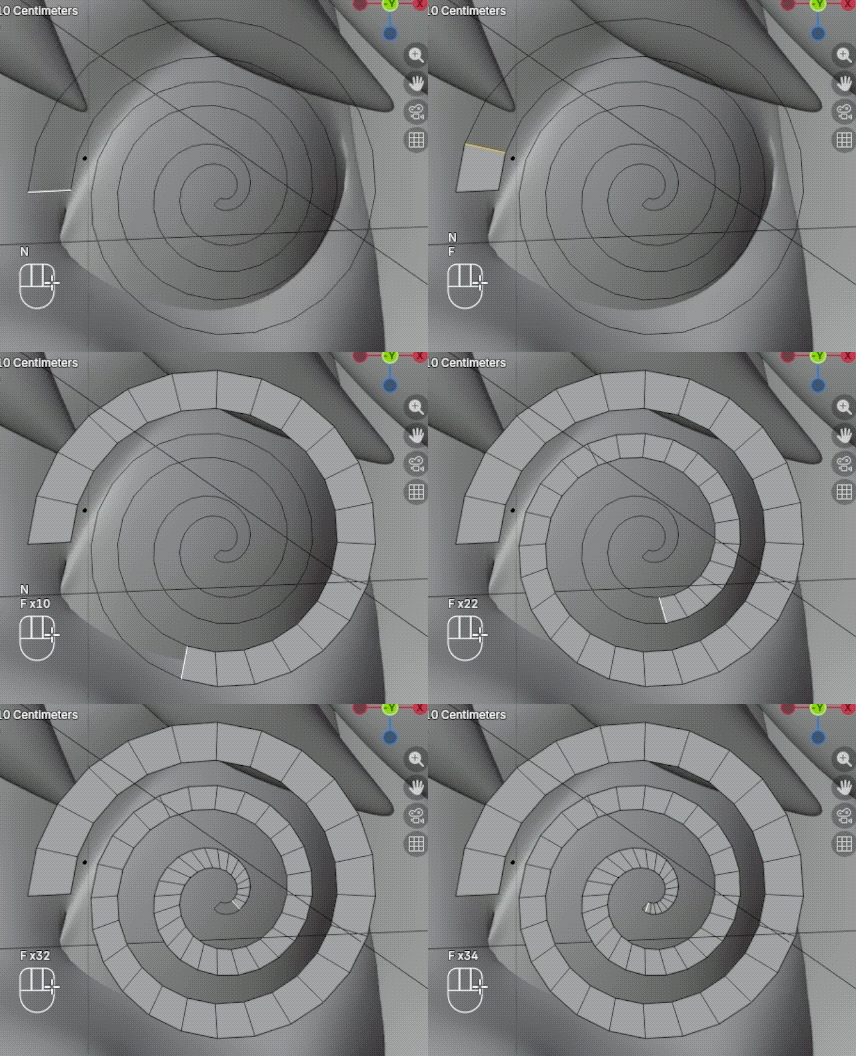
F2 is a godsend for retopology ohhhhhmylord. The 4th vertex doesn't even have to exist to make a quad, you can just select the oppisite vertex and press f and it perfectly positions a fourth vertex!! Also if you have 2 lines of parallel edges you can select the connecting edge and keep pressing f or or hold down f until the gap is filled. IDK if I explained that well but u have to see for yourself, I can't believe I was manually bridging edges and filling quads this whole time.
OK so you want to animate a mesh but you don't feel like rigging, TWO WORDS: SHAPE KEYS. But that also takes a while so keymesh (IGNORE the landing page it's so scary ToT) lets you animate between shape keys quicker by treating each shape key like a single keyframe instead of a stackable values so you only gotta keyframe one thing. I used it for a paper-cut style animation where I needed to change the sillouette of planes as if I were switching out paper cutouts, so if you're into that, there u go. I imagine it's also good for general stop motion.
Because why would you ever want to model your own tree or literal miles of mountains for a set, you must be insane
Also a native addon, edit > preferences > addons, rigify lets you make professional rigs by replacing armature bones with controllers. You do not need rigify to make a functional rig, but it makes you look like you know what you're doing (totally not saying this bc I've still never correctly used this addon).
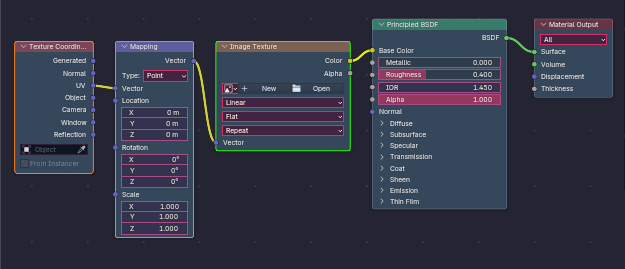
MY PERSONAL FAVORITE!! I spam tf out of this one every shader I make. Enable it natively in edit > preferences > addons, it lets you connect the texture coordinate to mapping to image texture node combo to whatever node you're selecting, name a more iconic trio. Text coord and mapping manipulate the image, the image can be swapped out for a procedural texture and THEN get plugged into almost any property. Usually base color.
5.30.23: Emulate 3 Button Mouse!
TECHNICALLY this isn't an addon but I wanted to include it. This lets you to quickly switch to a head-on angle in the viewport with alt + left-mouse. edit > preferences > input > mouse > emulate 3 button mouse
Looptools allow you to manipulate vertices, edges, and faces, more precisely, and much easier. You can do things like turning any amount of vertices into a perfect circle, aaand thats kinda all I use it for LOL (Sounds rly specific but I need it more often than I would think). I meann I also use relax a lot which helps to smooth out messy topology. There is also a flatten feature which, you guessed it, flattens whatever you selected on a certain axis, but in my experience it's not reliable so I'd actually recommend just doing it natively by using "s, (whatever axis), 0". OH also it lets you double click an edge to select an entire edge loop. Ik I didn't do a very good job selling this addon to you but just download it, you'll need it trust




