NODES
Nodes are like visual math. you have a bunch of preset functions and you plug in values to calculate an output. Blender has nodes in 4 areas:
-Shader Nodes
-Composite Nodes
-Geometry Nodes
-Texture Nodes
Focusing on the first 3 since i've never needed to procedurally generate a custom texture. You will notice that "custom textures" are extremely easy to create within the shader nodes soo... IMO I wouldn't bother but that might just be me
SHADER NODES
Shader nodes calculate how light affects (or doesn't affect) the color, texture, and other properties of an object. You can also create textures within the shader nodes.
6.8.26: Pack your images
(Idk where to put this but nodes is the closest) The worst experience ever as a blender / adobe user is opening your project file just to realize your image textures became unlinked / you accidentally deleted the original texture. NEVER FORGET to pack your image textures. Open your image in the image editor, and choose "pack" under the image menu or simply alt + s to pack your image in the blend file. Much easier than risking ruining all your work, and you can always unpack if you want. I looked up if there were any downsides bc it felt too good to be true and read that packing image textures "limits the compression that can be used." IDK what that means bc i'm an amateur but it can't possibly be that bad.
6.1.26: W.I.P
Tomodachi life style hair shader in the works.
4.21.26: custom blender builds
Blender is an open-source software which means you can alter the software and code FOR FREE!!! There's already a bunch of custom builds of blender out there like
Goo Engine and others that I totally know. Goo engine is designed for creating anime shaders and such, similar to genshin impact, and generally the 2.5D look by adding a bunch of useful functions and nodes. Never used it before but I really want to try.
4.6.26: (RANT) GUYS?? Nodes are fun
The idea of nodes, visual calculation, combined with how quickly it can get messy doesn't sound fun, but the visual part is actually carrying bc the most boring part of REAL math imo is that its JUST numbers, likee idc about calculating just for a number. Nodes are like math but with an immediate visual payoff, you can see what you're making in real time and the possibilities are endless bc you can just keep adding nodes until you have a million of them and it's beautiful. Probably a good idea to frame sections as you make them though (I've never gotten to the point where I needed to bake my shader to condense it but it's a thing you can do). Genuinely I wish I had toonboom purely so I could use the shader nodes. I wish every animation software and art programs in general had nodes bc ngl I have thought way too many times while I was using another software that I need a node function for what i'm doing... Listenn they're easy to understand and it's like a texture-pattern sandbox they're so fun!! HUGE FEATURE BTW once you complete your shader you can reuse it forever, and blender makes it really easy to store your assets and append them from other projects with the asset browser. I like to just append everything to one master file and then mark everything as asset so I can literally just drag and drop shaders, lighting setups, meshes, ETC without having to search for the file
4.1.26: BUILD YOUR SHADERS IN EEVEE. PLEASE.
I am ashamed to have been a cycles purist. When I found out that shoving all my projects through this render engine would magically make my shitty lighting and shader I made in 0.2 seconds look pretty good I was GEEKED to say the least, but as soon as I entered college I realized wait. adults actually don't have time to do anything and now all of my beloved shaders are incompatible with eevee </3 and I have to wait literal days on end to render 25% of my animation. Save yourself and don't fall into this trap that might've only been designed for me
3.7.26: Procedural eyeballs
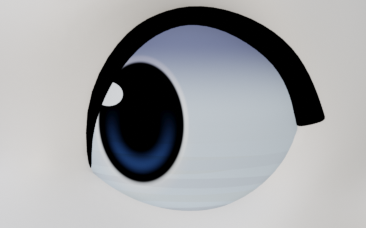
It was such an obvious solution but for some reason I never thought to do it? Before you struggle to texture paint a circle that projects well onto a sphere, stop and think for a moment. You could make ONE eyeball material and never have to worry about eyeballs for the rest of your life. If you have a basic understanding of shader nodes you can VERY easily make an eyeball material, it's just a lot of spherical gradients layered on top of each other. And look how good it looks!!! And because it's procedural you can scale it up as much as you want and it won't get pixelated :)
COMPOSITE NODES
Compositing nodes composite your rendered images, and can alter the rendered image based on the blend file's properties. The compositer also works on any imported sequence. But why would you do that. We're actually supposed to use nuke to composite but no student can afford that so this is the best we got </3
1.22.26: KUWAHARA
I slap this node on almost everything I make. It makes the render look nice and fuzzy and painted and I really like how it textures the terminator and highlight.
GEOMETRY NODES
Geometry nodes are like an extremely customizable particle system, as well as a way to procedurally modify geometry like meshes and curves. (ngl this is my weak point, will probably get updated the least)
1.22.26: automatic pinata / feather rotation arrangement
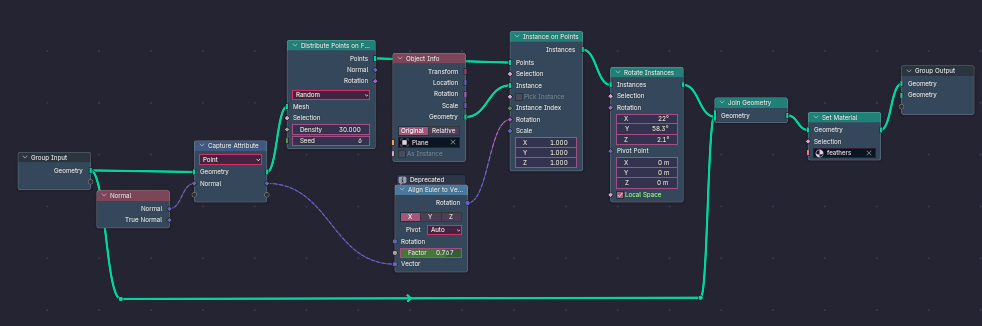
Haven't you always wanted to make a pinata in blender yes I know you have so I had this problem once, I emailed this blender youtuber I liked for his geo nodes bc I needed it for a school assignment and he unfortunately never found them sso I had to remake it myself. Ok I was gonna explain but I think i'll just insert a screenshot of my setup later instead. It's not too complicated but the titles of geometry nodes are quite scary. "plane" is the base feather mesh that will be duplicated, "feathers" is the material for the feathers. Geo nodes dont automatically take on the material of the object that the modifier is put on, you have to add a set material node if you want your geo nodes to have a material. The img is high enough res to be legible just zoom in
(THIS SETUP IS VERY IMPERFECT, I WILL EDIT IT IN THE FUTURE. The original version of this setup that worked perfectly is impossible as of blender 5.0 due to some nodes being removed.)
TEXTURE NODES
Nothing to see here
I already told u I've never seen anyone use these ToT



